

Cybersecurity
The Midnight Patch: How a Fake Software Update Locked a Regina Pharmacy’s Prescription System


REGINA, Sask. — October 29, 2026 — The message arrived just after closing time, when the pharmacy’s day staff had gone home and a single pharmacist was finishing the evening’s paperwork. It looked like a routine software update from the pharmacy’s prescription system provider. It used the provider’s name, its usual formatting, and a familiar reference to an overnight maintenance window. It asked for one small action before morning: click to install the patch.
Prairie Rose Pharmacy, the fictional Regina neighbourhood pharmacy at the centre of the story, clicked — and by morning, its prescription system was locked.
The update was not from the provider. The provider had sent no update that night.
“We had installed their updates before, and this one looked exactly the same,” said Elaine Carver, the pharmacy’s fictional owner-pharmacist. “The logo was right, the wording was right, and it arrived at the hour their real updates usually arrive. It was only when the system asked for a payment to unlock our own patient records that we realized we had installed the attack ourselves.”
The message was a classic fake-update lure: not a break-in through a firewall, but an invitation to open the door. Cybersecurity advisors familiar with the fictional case say the link led to a near-copy of the provider’s download page, and the file it delivered encrypted the pharmacy’s prescription records while leaving its front-of-store systems untouched — a precision that made the ransom demand feel, to a panicked night shift, almost like a legitimate support bill.
The attack did not need advanced malware. It needed a familiar name, a quiet hour, and a process with no second check.
After-hours messages are a known pressure point, advisors say. One person is on duty, the usual colleagues who might spot something odd are gone, and a message framed as routine maintenance — “install before morning, or the system will be out of date” — is more likely to be actioned than questioned.
“People don’t click these because they are careless,” said one cybersecurity advisor familiar with small-business ransomware cases. “They click because the message arrives inside a real routine, about a real system, at the moment they are trying to finish the day.”
In this case, the warning signs were small and easy to miss in isolation: a sender address that did not quite match the provider’s domain, a download page that asked the pharmacist to disable a security prompt first, and an update that arrived by email rather than through the prescription system’s own built-in updater — something the real provider had never done.
Prairie Rose Pharmacy says it has since changed its update process. Software updates now come only through the system’s own updater or a callback to a number already on file — never through a link in an email — and no update is installed outside business hours without a second staff member confirming it. Patient records are now backed up offline each night, so a locked system no longer means a locked pharmacy.
The fix, experts say, is deliberately unglamorous: never install an update from a link, and never let one person be the only check.
That advice applies well beyond pharmacies. Across Canada, small and mid-sized clinics, pharmacies, and professional offices remain prime targets precisely because their IT processes are lean: one person often manages the system, the updates, and the evening close, and a trusted vendor’s name is treated as proof, not a claim to verify.
For small businesses, the checklist is short: install updates only through the software itself or a vendor portal you navigate to yourself, treat any after-hours update request as a stop-and-verify moment, and keep an offline backup that an attacker cannot reach from the same machine. For vendors, it is equally simple: tell customers, in advance, that you will never send an update by email link — and that any message claiming otherwise is a fake.
Prairie Rose Pharmacy says it did not pay the ransom. With help from its IT support provider, it restored its records from backup and reopened with a paper fallback in place for the morning’s prescriptions. No estimate of the disruption’s cost has been released.
The update notice itself looked real. The update was not. And the difference — a few characters in a sender address, and one unchecked click — was all it took.
Watching the perimeter — and what slips past it.
ODTN News note: ODTN.News is a fictional news platform set within the Operation: Defend the North universe. All names, organizations, quotes, and events in this article are entirely fictitious. Any resemblance to real people, companies, or incidents is purely coincidental. The cybersecurity challenges it represents are very real.







Cybersecurity
The Wrong QR Code: How a Sticker on a Halifax Harbour Kiosk Redirected Tourists — and Their Payments
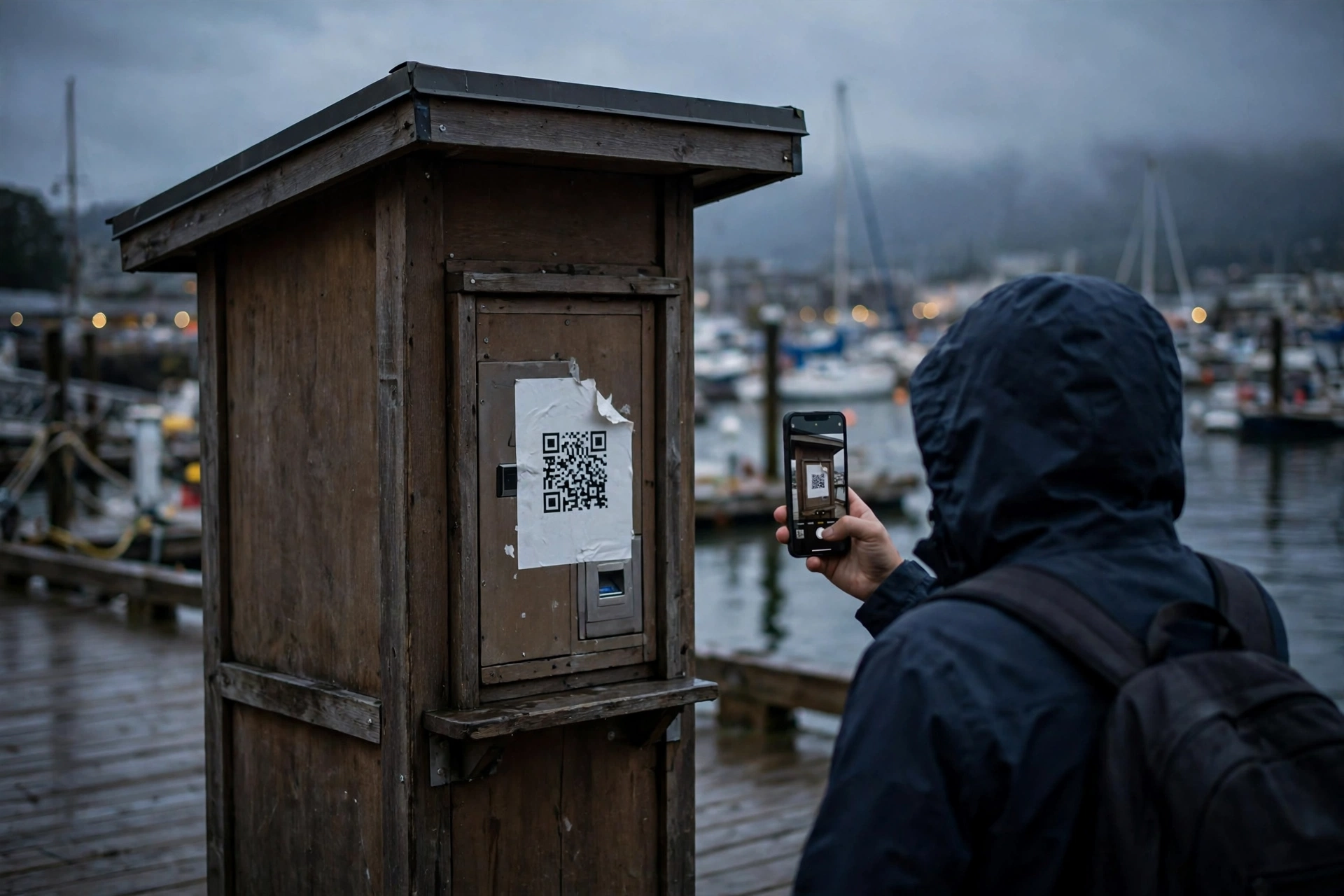
HALIFAX, N.S. — October 28, 2026 — The sticker looked official. It was the right size, the right shape, and it sat exactly where a visitor would expect a payment code to be — over the harbour tour kiosk’s own code, on a busy stretch of the Halifax boardwalk.
Tourists who scanned it did not reach the tour operator’s booking page. They reached a convincing copy of it, complete with sailing times, ticket prices, and a checkout form that collected card details and sent nothing back but a fake confirmation.
The scam did not hack the kiosk. It simply covered it up.
Harbourlight Tours, the fictional operator that runs the kiosk, says the sticker was discovered by a staff member during a morning walk-around, after several customers arrived at the dock holding confirmations the company had never issued. The legitimate code underneath was untouched. The fake one on top did all the work.
“We check the kiosks every morning, and that morning we almost missed it,” said Elena Marsh, the company’s fictional operations manager. “It looked like ours. It was only when a customer showed us their confirmation email that we realized the money had gone somewhere else entirely.”
QR code stickers are cheap, fast to print, and almost impossible for a passerby to verify by eye.
Fraud prevention advisors say that is precisely why the tactic keeps spreading — from parking meters to restaurant tables to transit stops. The attacker needs no access to the business’s systems, no malware, and no inside help. A printer, a sticker, and a busy location are enough.
“People trust a code that is already in place,” said one fraud prevention advisor familiar with payment scams. “Nobody stops on a boardwalk to inspect a sticker. They scan, they pay, and they walk to the boat.”
The copied booking page added to the illusion. It mirrored the real site’s layout and prices, and its confirmation emails arrived promptly — so promptly that several victims only learned they had been scammed when they tried to board and their names were not on the list.
Harbourlight Tours says it has since replaced the kiosk codes with tamper-evident panels, added a second check to its morning routine, and posted a notice telling visitors to book only through the staffed window or the address printed on the kiosk itself, not through any loose sticker.
The fix, experts say, is boring — and that is the point. Businesses that rely on public-facing codes should inspect them on a schedule, use codes that cannot be peeled and replaced without leaving evidence, and give customers a second way to verify: a staffed counter, a printed address, or a code displayed behind glass.
For visitors, the advice is simpler still: if a payment code looks stuck on, layered, or slightly off-centre, do not scan it. Step inside, ask a staff member, or type the business’s address yourself.
Harbourlight Tours says affected customers have been offered rebookings, and the company is working with its payment provider to trace the diverted transactions. No estimate of total losses has been released.
The boardwalk is busy again, and the kiosk is back in service. The sticker is gone. But the lesson it left behind is hard to peel off: in a world where paying means pointing a phone at a square, the square itself has become a target.
Watching the perimeter — and what slips past it.
ODTN News note: ODTN.News is a fictional news platform set within the Operation: Defend the North universe. All names, organizations, quotes, and events in this article are entirely fictitious. Any resemblance to real people, companies, or incidents is purely coincidental. The cybersecurity challenges it represents are very real.
Cybersecurity
The Changed Bank Details: How One Spoofed Email Diverted a Winnipeg Distributor’s Payment

WINNIPEG, Man. — October 28, 2026 — The email arrived on a Friday afternoon, at the exact moment the accounts office was clearing its end-of-week payments. It looked like it came from a long-time supplier. It used the supplier’s name, its usual sign-off, and a familiar invoice reference. It asked for one small change before the money went out: please update our bank details.
Prairie Frost Distribution, the fictional Winnipeg cold-storage company at the centre of the story, made the change — and sent a five-figure payment to an account it had never used before.
The supplier had not sent the email. The supplier had not changed its bank details.
“We had paid this supplier dozens of times,” said Dana Whitfield, the company’s fictional finance manager. “The email sounded like them, the invoice number matched, and the request seemed routine. It was only on Monday, when the real supplier called about an overdue invoice, that we realized the money had gone somewhere else entirely.”
The message was a classic business email compromise: not a hacked system, but a carefully impersonated one. Investigators familiar with the fictional case say the sender’s address was a near-copy of the real domain — close enough to pass a busy Friday glance, different enough to route replies to the attacker.
The fraud did not need malware. It needed timing, familiarity, and a process with no second check.
Friday afternoons are a known pressure point, fraud prevention advisors say. Staff are clearing queues, suppliers are closing their own weeks, and a request framed as urgent — “please update before this payment runs” — is more likely to be actioned than questioned.
“People don’t fall for these emails because they are careless,” said one fraud prevention advisor familiar with payment scams. “They fall for them because the email arrives inside a real workflow, about a real invoice, at the moment they are trying to finish the job.”
In this case, the warning signs were small and easy to miss in isolation: a reply-to address that did not match the sender, a bank account in a different institution from the supplier’s usual one, and a request to change payment details by email alone — something the real supplier had never asked for.
Prairie Frost Distribution says it has since changed its payment process. Bank-detail changes now require a callback to a known number — never a number printed in the email making the request — plus a second approver before any altered payment is released. Staff have also been briefed to treat any payment-change request, however routine it looks, as a stop-and-verify moment.
The fix, experts say, is deliberately unglamorous: slow the payment down, check it another way, and never let an email alone move money to a new account.
That advice applies well beyond cold storage. Across Canada, small and mid-sized businesses remain prime targets precisely because their payment processes are lean: one person often prepares, approves, and sends a payment, and suppliers are trusted partners, not suspects.
For businesses, the checklist is short: verify bank changes by phone using a number already on file, require two people to approve any new payee account, and flag any change request that arrives with urgency attached. For suppliers, it is equally simple: tell customers, in advance, that you will never change bank details by email alone.
Prairie Frost Distribution says it is working with its bank and payment provider to trace the diverted funds. No estimate of recovery has been released.
The invoice itself was real. The account was not. And the difference — a few characters in an email address, and one unchecked change — was all it took.
Watching the perimeter — and what slips past it.
ODTN News note: ODTN.News is a fictional news platform set within the Operation: Defend the North universe. All names, organizations, quotes, and events in this article are entirely fictitious. Any resemblance to real people, companies, or incidents is purely coincidental. The cybersecurity challenges it represents are very real.
Cybersecurity
The Quiet Lockout: How a Forged Vendor Update Froze a Small Nova Scotia Town’s Services
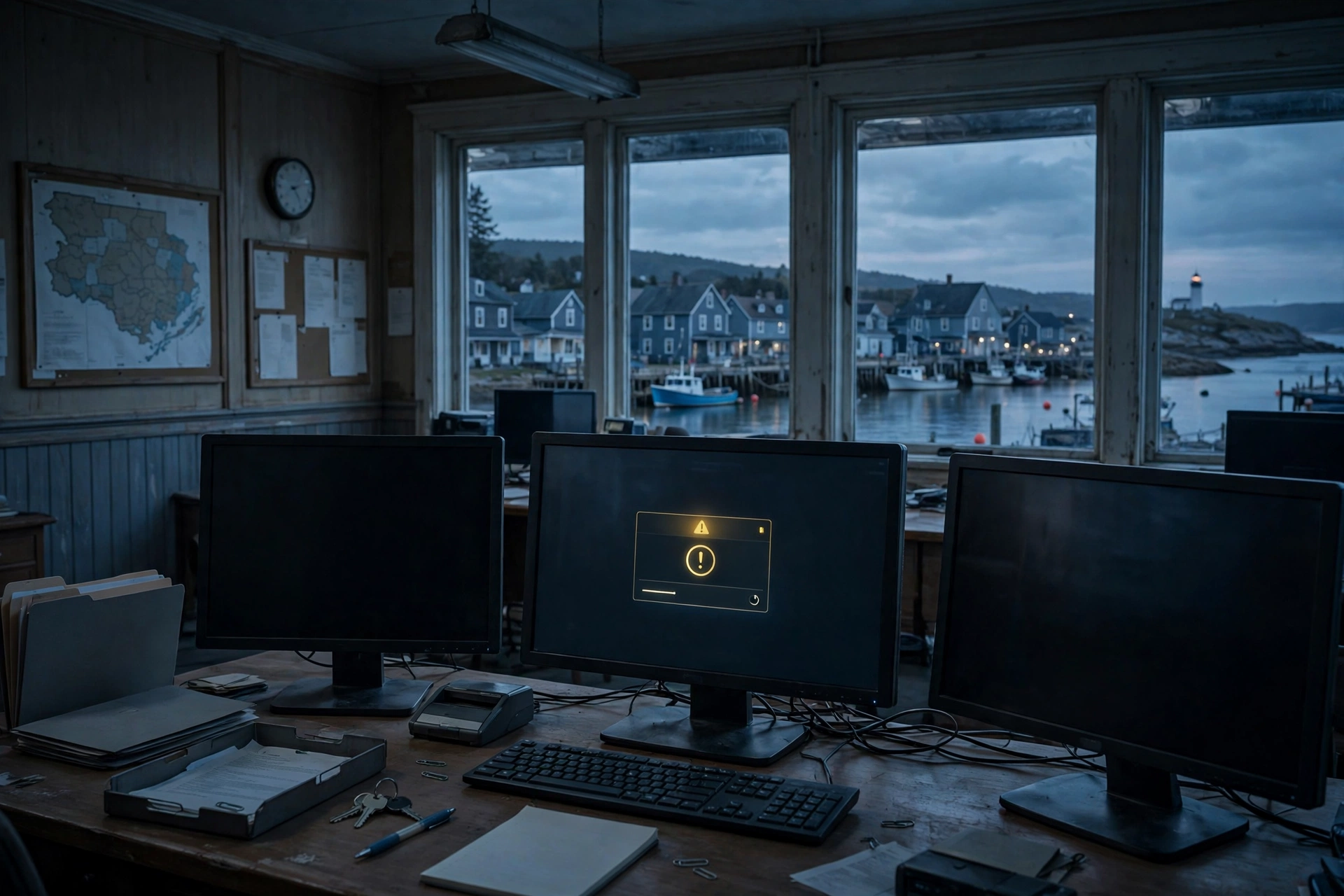
PORT ALDER, N.S. — October 27, 2026 — Residents of Port Alder did not notice the attack when it began. There was no ransom note on a public screen, no dramatic shutdown, and no warning siren. There was only a routine software update, approved through a familiar vendor portal, that quietly locked the town out of its own systems.
By the time municipal staff realized what had happened, payment processing, permit applications, and internal email were unavailable. The town’s public works scheduling system was frozen. Phones still worked. The website still loaded. But behind the scenes, the small team that keeps a town running could not reach the tools it relies on every day.
“We kept waiting for something to look like an attack,” said one municipal employee familiar with the response. “It never did. It looked like a bad update, until it didn’t get better.”
According to people familiar with the incident, the disruption began with a forged update pushed through a third-party service provider used by the municipality. The update was not obviously malicious on arrival. It carried the right branding, the right timing, and a plausible change log. Once installed, it restricted administrative access and began encrypting key operational files.
No evidence has emerged that resident personal data was published, and officials say emergency services were not affected. But the incident has renewed a difficult question for smaller Canadian communities: what happens when the systems are too small to attract a dedicated security team, but too important to fail?
Port Alder is not unusual. Across Canada, small and mid-sized municipalities often depend on a handful of vendors, shared service providers, and generalist IT staff who cover everything from password resets to procurement. That concentration is efficient — until a single trusted channel becomes the way in.
“The attacker didn’t need to break down the front door,” said one cybersecurity advisor familiar with municipal networks. “They just needed to look like someone who already had a key, and to arrive on a day when everyone was busy.”
That timing mattered. The update arrived during a week of budget preparation, when staff were focused on council deadlines rather than system alerts. Initial error messages were treated as a vendor problem, not a security incident. Hours passed before the pattern — locked accounts, inaccessible backups, and a frozen scheduling system — was treated as a single event rather than three separate glitches.
Investigators are now examining a detail that has troubled responders in similar incidents: the town’s backups were reachable from the same administrative environment as its live systems. When access was restricted, recovery became slower and more uncertain. The town was not without backups. It was without a clean, separate path back to them.
“Backups are not a plan on their own,” said another incident response specialist. “A backup you cannot reach, test, and restore under pressure is a hope, not a control.”
The incident also exposed a communications gap. Residents learned about service delays in fragments — a notice here, a closed counter there — while staff worked to understand the scope. For a small town, trust is built face to face, and uncertainty spreads quickly when the usual channels go quiet.
Experts say the lesson is not that small municipalities need enterprise-sized security budgets. It is that they need a small number of non-negotiable practices, rehearsed before a crisis: separate and tested backups, multi-factor authentication on every vendor and administrative account, a short list of who decides what during an outage, and a public message ready to go before it is needed.
“Tabletop exercises are often treated as something for big cities and big companies,” said one crisis preparedness advisor. “But a small team benefits more, not less, from knowing its first three moves. When the system goes quiet, you should not be deciding your response for the first time.”
Port Alder’s services are being restored in stages, with manual workarounds in place for payments and permits. Officials have not disclosed whether a ransom demand was made, and have not attributed the incident to a specific group.
What is clear is the pattern it fits. Across Canada in 2026, attackers have increasingly targeted trusted tools, vendor connections, and routine processes — the parts of a system people are trained not to question. The goal is not always theft. Sometimes it is disruption, delay, and doubt.
For Port Alder, the recovery will take longer than the outage made visible. Systems can be restored. Confidence — in a vendor update, in a backup, in a quiet Tuesday morning — takes longer to rebuild.
That is why preparedness matters before the update arrives, not after it.
Watching the perimeter — and what slips past it.
ODTN News note: ODTN.News is a fictional news platform set within the Operation: Defend the North universe. All names, organizations, quotes, and events in this article are entirely fictitious. Any resemblance to real people, companies, or incidents is purely coincidental. The cybersecurity challenges it represents are very real.


The Midnight Patch: How a Fake Software Update Locked a Regina Pharmacy’s Prescription System

The Phantom Load: How a Fake Freight Posting Diverted a Truckload of Winter Supplies in Northern Ontario

The Wrong QR Code: How a Sticker on a Halifax Harbour Kiosk Redirected Tourists — and Their Payments

Reddit Thread Over ‘Inventory Drift’ Surges as Canadians Vent Over Retail Glitches

Are Canadian Companies Learning from Global Cyber Attacks? Insider Insights into the Secret Downfall of Canadian Businesses

Canadian Airline NorthSky Faces Cyberattack, Disrupting Online Services


-
 Public1 year ago
Reddit Thread Over ‘Inventory Drift’ Surges as Canadians Vent Over Retail Glitches
-
 Business1 year ago
Are Canadian Companies Learning from Global Cyber Attacks? Insider Insights into the Secret Downfall of Canadian Businesses
-
 Cybersecurity1 year ago
Canadian Airline NorthSky Faces Cyberattack, Disrupting Online Services
-

 Retail Watch1 year ago
Calgary Small Business Hit by Sudden Payment Outage, Sparks Cybersecurity Concerns
-

 Business2 years ago
Canadian Software Vendor Breach Exposes Cloud Environments Across Energy Sector
-

 Business1 year ago
siberX Mart Supply Chain Snarled as Digital Transformation Faces Cyber Threats
-
 Politics1 year ago
Nationwide Government System Outage Paralyzes Public Services
-

 Retail Watch1 year ago
Understaffed and overwhelmed, IT teams face rising pressure as retail digitization accelerates